
Deploying an automation: test the business outcome
A practical acceptance guide for n8n workflows and connected apps, from configuration to recovery and handover.
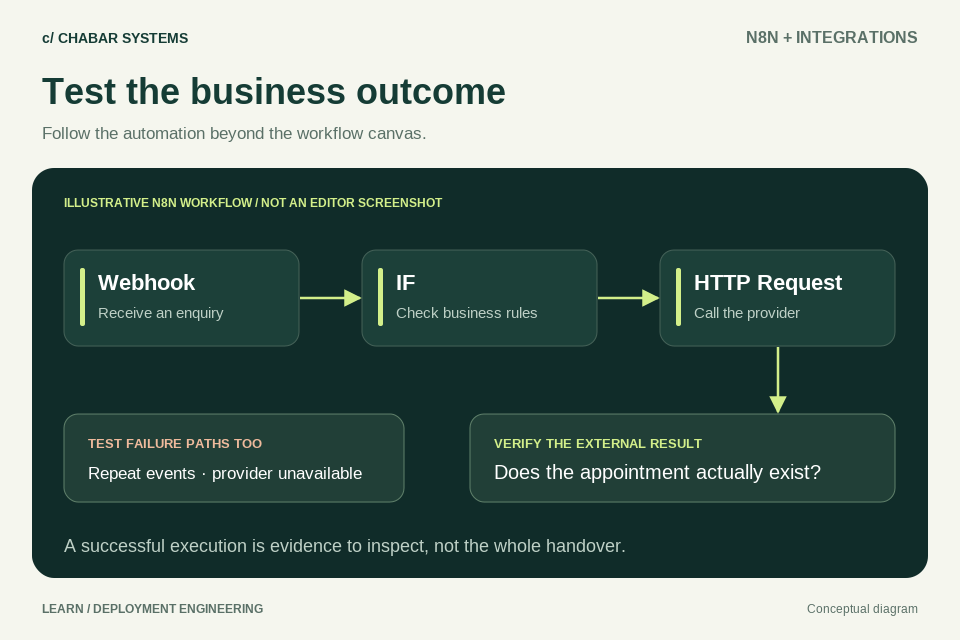
A running workflow service is one part of a delivered automation. The client needs confidence that the intended action happens, failures are visible, and someone can operate the system afterward.
Consider an enquiry that should create an appointment. Test the complete path: receive the enquiry, apply business rules, create the appointment and show the result to the authorized team.
The diagram uses real n8n node names to illustrate a candidate flow. See the official workflow components guide for how nodes and connections fit together.
Define acceptance before deployment
Describe the expected outcome in the client’s language. Name the approver and agree test inputs, external destinations and evidence. Use synthetic records and controlled accounts where possible. Obtain authorization before tests incur provider charges or create real appointments.
| Scenario | Evidence to review |
|---|---|
| Valid enquiry | The intended record exists in the correct destination |
| Unsupported request | The user receives the agreed response |
| Repeated event | The result follows the agreed duplicate-handling policy |
| Provider unavailable | Failure is visible without a false success message |
| Unauthorized user | Private information remains inaccessible |
| Service redeployed | Required records and settings remain available |
These are candidate checks, not capabilities guaranteed by every automation. Identify unsupported behavior before agreeing launch scope.
Check runtime configuration separately
In Chabar’s current delivery framework, deploying source and configuring business integrations are separate tasks. Runtime n8n workflow imports, credential mappings, activation and provider settings require explicit review. Our current process does not automatically synchronize those settings from Git.
Record the deployed source revision alongside runtime configuration. Confirm the correct client’s credentials, calendar, callback destinations and user access. Store secrets and actual client records privately.
Make recovery a functional test
Specify which data and configuration must be recoverable, who performs recovery and what interruption the business can tolerate. Plan an isolated rehearsal. Review callbacks and scheduled actions before enabling them so a restored test environment does not send live messages or create duplicate bookings.
Distinguish a proposed recovery procedure from a completed restore test. Monitoring also needs an alert destination and a person responsible for acting.
Hand over an operating agreement
Give the client a short guide covering access, the primary task, signs of failure and the support contact. Give the operator configuration references, release procedures, recovery instructions and known limitations.
Agree support coverage explicitly. An application available outside business hours does not itself create an around-the-clock engineering service.
For platform choices, read who operates what with Coolify. For launch and handover help, explore deployment consulting. To see a business solution in context, explore AI Receptionist.