
Coolify on a VPS: who operates what?
Understand platform, server and application responsibilities before self-hosting a business tool.
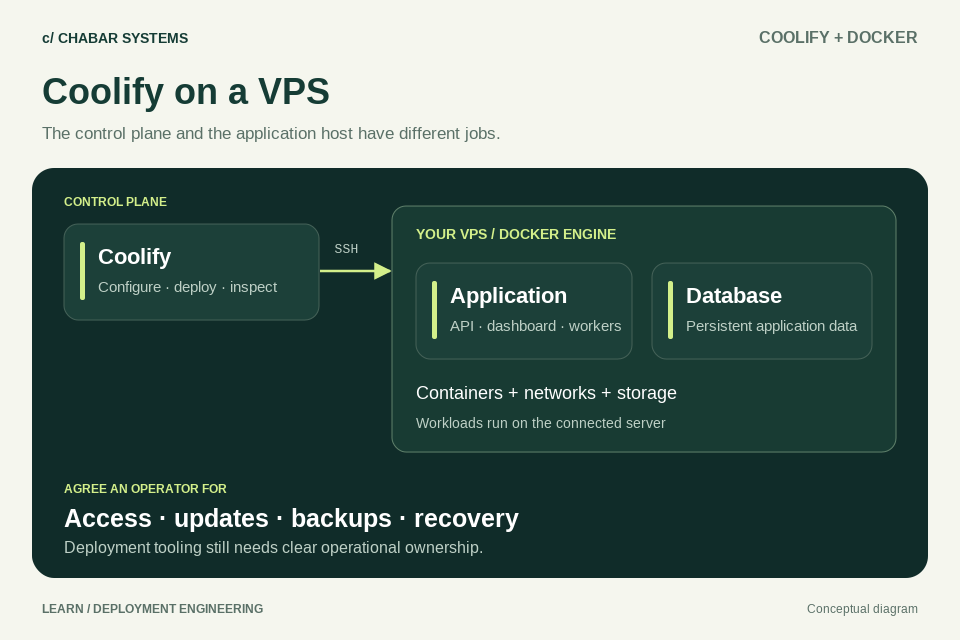
A business application needs somewhere to run. Choosing a VPS and deployment tools also means deciding who will look after the system after launch. Start with those responsibilities before comparing server prices.
Record ownership first
Identify who owns the hosting account, domain, source repository and connected provider accounts. Name the person who can authorize changes and the person who receives operational alerts.
For an agency delivering a client automation, this matters at handover: the client should understand what they own, what access the agency retains, and what happens when support ends.
Separate the platform from the workload
Coolify coordinates deployment of applications and services on servers you supply. Its official overview explains the boundary: server operation, access, secrets and a tested backup strategy remain your responsibility.
Use this planning record:
| Area | Decision to record |
|---|---|
| Hosting | Account owner, location and billing contact |
| Application | Source owner and approved release |
| Access | Operators and access removal procedure |
| Data | Backup owner and recovery expectations |
| Integrations | Provider accounts and callback destinations |
| Support | Contact, coverage and escalation arrangements |
Review the business workflow
Suppose a booking application depends on a calendar provider. An available web page does not show whether authorization has expired or whether an appointment was actually created. Design acceptance checks around the outcome the user needs.
Chabar’s delivery framework separates configuration, integration checks, acceptance evidence and operational ownership. This is a process to apply per engagement; a checklist does not configure monitoring or backups by itself.
Decide whether self-hosting fits
Ask whether your team can own routine server work or fund someone to do it. Compare the full operating cost, including support and recovery, with a suitable managed service.
When multiple clients share a host, agree the isolation requirements and review capacity. In our delivery policy, separate client deployments organize configuration and data; they do not remove dependence on a shared host and its administrators. Some projects need separate hosting.
Your next step
Create an ownership record before selecting your server. Then review the Docker Compose checklist and automation acceptance guide.
Need help choosing or implementing the setup? Explore application deployment consulting.